普段 iPhone を使っていて、Safari でブログをよく読むのですが、スマホ向けに最適化されていないページがまだ多く、見にくいと感じることがよくあります。 Safari には「リーダー表示」という機能があり、記事本文だけを抽出して見やすく表示できますが
iPhoneのSafariで記事を読んでいるときに気をそらすものを非表示にする - Apple サポート (日本)
https://support.apple.com/ja-jp/guide/iphone/iphdc30e3b86/ios
リーダー表示に対応していないページもあります。また、リーダー表示にしても、コードブロックや文中の変数のスタイルがわかりにくく、痒いところに手が届かないと感じることがあります。
そうした悩みがあり、スマホ向けに最適化されていないページを見やすくする Bookmarklet(ブックマークレット)を作成しました。 今回は作成した Bookmarklet の紹介と使い方を説明します。
スマホで Bookmarklet を設定する方法
Bookmarkletの設定方法は以下の通りです。
- お使いのブラウザで適当なページをお気に入り登録する
- Bookmarkletのコードをコピーする
- 先ほど登録したお気に入りを編集する
- URLの部分にコピーしたBookmarkletのコードを貼り付ける
- 名前をわかりやすい名前に変更する ( 例: Optimize for Mobile )
- 保存する
これで設定は完了です。
Bookmarklet のコード
「2.」で設定するBookmarkletのコードを以下に示します。 だいぶ長いので、中身は気にせずにコピーして設定してください。 (気になる人はコードの中身を読んでみてください。)
やってることを文章で簡単に説明すると、Webページに適用されているCSSを全て無効にした後に自作のCSSを無理やり適用してる、という感じです。
Bookmarkletに設定するコードはこちら
javascript:(() => {
  'use strict';

  /* ==================== Configuration ==================== */

  /**
   * Configuration object for the optimizer
   * @const {Object}
   */
  const CONFIG = {
    /** Auto-apply optimization on page load */
    autoApplyOptimization: true,

    /** Style element ID for injected CSS */
    styleElementId: 'mobile-page-optimizer-style',

    /** Data attribute for storing original styles */
    originalStyleAttr: 'data-original-style',

    /** Data attribute for marking disabled elements */
    disabledAttr: 'data-mobile-optimizer-disabled',

    /** Button configuration */
    button: {
      textEnabled: 'Mobile View OFF',
      textDisabled: 'Mobile View ON',
      position: { top: '10px', left: '10px' },
      zIndex: '2147483647',
    },

    /** Colors for theming */
    colors: {
      background: '#e8e0d5',
      text: '#333333',
      textDark: '#111111',
      link: '#0060bf',
      linkVisited: '#5a3696',
      linkHover: '#0077cc',
      codeInline: '#a83232',
      codeBackground: '#f5f2ed',
      codeBorder: '#d5c7b5',
      emphasis: '#8B4513',
      buttonActive: '#28a745',
      buttonInactive: '#f8f9fa',
    },
  };

  /* ==================== CSS Management ==================== */

  /**
   * Disables or enables all existing CSS on the page
   * Stores original styles for restoration
   *
   * @param {boolean} isDisabled - Whether to disable CSS
   */
  const disableCss = (isDisabled) => {
    try {
      /* Disable external and internal stylesheets */
      Array.from(document.styleSheets).forEach((sheet) => {
        try {
          sheet.disabled = isDisabled;
        } catch (e) {
          /* Some stylesheets may throw security errors (CORS) */
          console.warn('Cannot disable stylesheet:', e);
        }
      });

      if (isDisabled) {
        /* Save and remove inline styles */
        document.querySelectorAll('[style]').forEach((el) => {
          el.setAttribute(CONFIG.originalStyleAttr, el.getAttribute('style'));
          el.removeAttribute('style');
        });

        /* Disable style elements (except our own) */
        document.querySelectorAll('style').forEach((el) => {
          if (el.id !== CONFIG.styleElementId) {
            el.setAttribute(CONFIG.disabledAttr, 'true');
            el.textContent = '';
          }
        });
      } else {
        /* Restore saved inline styles */
        document.querySelectorAll(`[${CONFIG.originalStyleAttr}]`).forEach((el) => {
          el.setAttribute('style', el.getAttribute(CONFIG.originalStyleAttr));
          el.removeAttribute(CONFIG.originalStyleAttr);
        });

        /* Reload page if we disabled any style elements */
        if (document.querySelector(`[${CONFIG.disabledAttr}]`)) {
          location.reload();
        }
      }
    } catch (error) {
      console.error('Error in disableCss:', error);
    }
  };

  /**
   * Generates optimized CSS for mobile viewing
   *
   * @returns {string} CSS string
   */
  const generateOptimizedCSS = () => {
    const { colors } = CONFIG;

    return `
        /* Base Styles - Common */
        * {
          box-sizing: border-box !important;
          overflow-wrap: break-word !important;
          word-wrap: break-word !important;
          word-break: break-word !important;
          font-family: -apple-system, BlinkMacSystemFont, 'Segoe UI', Roboto, Oxygen, Ubuntu, Cantarell, 'Helvetica Neue', sans-serif !important;
        }

        /* Prevent Horizontal Scrolling & Basic Layout */
        html, body, #root, #app, .container, .wrapper, .content, main, article, section, header, footer, nav, div {
          width: 100% !important;
          max-width: 100% !important;
          min-width: 0 !important;
          margin-left: 0 !important;
          margin-right: 0 !important;
          box-sizing: border-box !important;
          overflow-x: hidden !important;
          position: static !important;
          left: auto !important;
          right: auto !important;
        }

        /* Body Element Base Styles */
        body {
          padding: 8px !important;
          overflow-y: auto !important;
          background-color: ${colors.background} !important;
          font-size: 16px !important;
          line-height: 1.6 !important;
          text-align: left !important;
          color: ${colors.text} !important;
          min-height: 100vh !important;
          height: auto !important;
        }

        /* Div Settings */
        div {
          clear: both !important;
          float: none !important;
          display: block !important;
          overflow: visible !important;
          height: auto !important;
        }

        /* Heading Elements */
        h1, h2, h3, h4, h5, h6 {
          text-align: left !important;
          margin: 0.8em 0 0.4em 0 !important;
          padding: 0 8px !important;
          width: auto !important;
          color: ${colors.textDark} !important;
        }

        h1 { font-size: 1.4em !important; }
        h2 { font-size: 1.3em !important; }
        h3 { font-size: 1.1em !important; }

        /* Paragraphs */
        p {
          width: 100% !important;
          margin: 0.6em 0 !important;
          padding: 0 10px !important;
          font-size: 16px !important;
          overflow: visible !important;
          color: ${colors.text} !important;
        }

        /* List Items */
        li {
          width: 100% !important;
          margin: 0.2em 0 !important;
          padding: 0 0px !important;
          font-size: 16px !important;
          overflow: visible !important;
          color: ${colors.text} !important;
        }

        /* Media Elements - Images, Videos, etc. */
        img, video, iframe, canvas, object, embed, svg {
          max-width: 100% !important;
          height: auto !important;
          display: block !important;
        }

        /* Table Elements */
        table, tbody, thead, tr, td, th {
          display: block !important;
          width: 100% !important;
          max-width: 100% !important;
          min-width: 0 !important;
          border-collapse: collapse !important;
        }

        /* List Elements */
        ul, ol {
          display: block !important;
          margin-left: 10px !important;
          padding-left: 20px !important;
          list-style-position: outside !important;
        }

        /* List Markers */
        ul { list-style-type: disc !important; }
        ol { list-style-type: decimal !important; }
        ul ul { list-style-type: circle !important; }
        ul ol { list-style-type: decimal !important; }
        ol ul { list-style-type: disc !important; }
        ol ol { list-style-type: lower-alpha !important; }

        /* Inline Elements */
        span, a, em, strong, i, b {
          display: inline !important;
          max-width: 100% !important;
          width: auto !important;
        }

        /* Emphasis Elements */
        strong, b {
          font-weight: 700 !important;
          color: #000000 !important;
          letter-spacing: 0.02em !important;
        }

        /* Italic Elements */
        em, i {
          font-style: italic !important;
          color: ${colors.emphasis} !important;
          letter-spacing: 0.01em !important;
        }

        /* Link Elements */
        a {
          color: ${colors.link} !important;
          text-decoration: underline !important;
          font-weight: 500 !important;
          border-bottom: 1px dotted rgba(0, 96, 191, 0.3) !important;
          padding-bottom: 1px !important;
          min-height: 44px !important;
          min-width: 44px !important;
        }

        a:visited { color: ${colors.linkVisited} !important; }
        a:hover {
          color: ${colors.linkHover} !important;
          text-decoration: none !important;
          border-bottom: 1px solid rgba(0, 96, 191, 0.7) !important;
        }

        /* Touch Target Size */
        button, input, select, textarea {
          min-height: 44px !important;
          min-width: 44px !important;
        }

        /* Code Elements */
        code, kbd, samp {
          font-family: 'SFMono-Regular', Consolas, 'Liberation Mono', Menlo, Courier, monospace !important;
          font-size: 12px !important;
          line-height: 1.4 !important;
        }

        /* Inline Code */
        code:not(pre code) {
          background-color: rgba(0, 0, 0, 0.05) !important;
          border-radius: 3px !important;
          padding: 2px 4px !important;
          color: ${colors.codeInline} !important;
        }

        /* Preformatted Text */
        pre {
          overflow-x: auto !important;
          white-space: pre !important;
          width: 100% !important;
          background-color: ${colors.codeBackground} !important;
          color: ${colors.text} !important;
          padding: 15px !important;
          border: 1px solid ${colors.codeBorder} !important;
          border-radius: 6px !important;
          margin: 10px 0 !important;
          font-family: 'SFMono-Regular', Consolas, 'Liberation Mono', Menlo, Courier, monospace !important;
          font-size: 16px !important;
          line-height: 1.4 !important;
          display: block !important;
          word-wrap: normal !important;
          word-break: keep-all !important;
          overflow-wrap: normal !important;
          -webkit-overflow-scrolling: touch !important;
        }

        /* Code Inside Pre Tags */
        pre code {
          background-color: transparent !important;
          border: none !important;
          padding: 0 !important;
          margin: 0 !important;
          display: inline !important;
          white-space: pre !important;
          overflow: visible !important;
          word-wrap: normal !important;
          word-break: keep-all !important;
          overflow-wrap: normal !important;
          color: inherit !important;
        }

        /* Inline Code in Paragraphs */
        p code, li code, td code {
          padding: 2px 5px !important;
          border-radius: 3px !important;
          display: inline !important;
          white-space: normal !important;
          font-size: 90% !important;
          background-color: rgba(0, 0, 0, 0.05) !important;
          color: ${colors.codeInline} !important;
          border: 1px solid ${colors.codeBorder} !important;
        }

        /* Blockquote Elements */
        blockquote {
          margin: 1.2em 0 !important;
          padding: 15px !important;
          padding-left: 20px !important;
          background-color: rgba(0, 0, 0, 0.03) !important;
          border-left: 4px solid #a89968 !important;
          border-radius: 3px !important;
          font-style: italic !important;
          color: ${colors.textDark} !important;
          line-height: 1.7 !important;
          position: relative !important;
        }

        blockquote p {
          margin: 0.5em 0 !important;
          padding: 0 !important;
          font-style: italic !important;
        }

        blockquote p:first-child {
          margin-top: 0 !important;
        }

        blockquote p:last-child {
          margin-bottom: 0 !important;
        }

        /* Hidden Elements */
        aside, nav.sidebar, .sidebar, .ad-container,
        svg.svg-icon, [class*="icon"], [class*="Icon"] {
          display: none !important;
        }
      `;
  };

  /**
   * Updates viewport meta tag for mobile optimization
   *
   * @param {boolean} isEnabled - Whether to enable mobile viewport
   */
  const updateViewportMeta = (isEnabled) => {
    const VIEWPORT_CONTENT = 'width=device-width, initial-scale=1.0, maximum-scale=5.0, user-scalable=yes';
    const ORIGINAL_CONTENT_ATTR = 'data-original-content';

    let viewportMeta = document.querySelector('meta[name="viewport"]');

    if (isEnabled) {
      if (viewportMeta) {
        if (!viewportMeta.hasAttribute(ORIGINAL_CONTENT_ATTR)) {
          viewportMeta.setAttribute(ORIGINAL_CONTENT_ATTR, viewportMeta.getAttribute('content'));
        }
      } else {
        viewportMeta = document.createElement('meta');
        viewportMeta.setAttribute('name', 'viewport');
        document.head.appendChild(viewportMeta);
      }
      viewportMeta.setAttribute('content', VIEWPORT_CONTENT);
    } else if (viewportMeta) {
      if (viewportMeta.hasAttribute(ORIGINAL_CONTENT_ATTR)) {
        viewportMeta.setAttribute('content', viewportMeta.getAttribute(ORIGINAL_CONTENT_ATTR));
        viewportMeta.removeAttribute(ORIGINAL_CONTENT_ATTR);
      } else {
        viewportMeta.remove();
      }
    }
  };

  /**
   * Applies or removes mobile-optimized CSS
   *
   * @param {boolean} isEnabled - Whether to enable optimization
   */
  const optimizeForSmartphone = (isEnabled) => {
    try {
      updateViewportMeta(isEnabled);

      let optimizeStyle = document.getElementById(CONFIG.styleElementId);

      if (isEnabled) {
        if (!optimizeStyle) {
          optimizeStyle = document.createElement('style');
          optimizeStyle.id = CONFIG.styleElementId;
          document.head.appendChild(optimizeStyle);
        }
        optimizeStyle.textContent = generateOptimizedCSS();
      } else if (optimizeStyle) {
        optimizeStyle.textContent = '';
      }
    } catch (error) {
      console.error('Error in optimizeForSmartphone:', error);
    }
  };

  /* ==================== UI Components ==================== */

  /**
   * Creates the toggle button for mobile optimization
   *
   * @returns {HTMLButtonElement} The created button element
   */
  const createToggleButton = () => {
    const button = document.createElement('button');
    const { button: btnConfig, colors } = CONFIG;

    /* Set initial state */
    let isOptimized = false;

    /* Apply base styles */
    Object.assign(button.style, {
      position: 'fixed',
      top: btnConfig.position.top,
      left: btnConfig.position.left,
      zIndex: btnConfig.zIndex,
      padding: '10px 15px',
      backgroundColor: colors.buttonInactive,
      color: 'black',
      border: '1px solid #ccc',
      borderRadius: '5px',
      fontSize: '16px',
      fontWeight: 'bold',
      cursor: 'pointer',
      boxShadow: '0 2px 5px rgba(0,0,0,0.2)',
      transition: 'all 0.3s ease',
    });

    /**
     * Updates button appearance based on optimization state
     */
    const updateButtonState = () => {
      button.textContent = isOptimized ? btnConfig.textEnabled : btnConfig.textDisabled;
      button.style.backgroundColor = isOptimized ? colors.buttonActive : colors.buttonInactive;
      button.style.color = isOptimized ? 'white' : 'black';
    };

    updateButtonState();

    /* Add click handler */
    button.addEventListener('click', () => {
      try {
        isOptimized = !isOptimized;
        disableCss(isOptimized);
        optimizeForSmartphone(isOptimized);
        updateButtonState();
      } catch (error) {
        console.error('Error toggling optimization:', error);
      }
    });

    /* Add hover effect */
    button.addEventListener('mouseenter', () => {
      button.style.transform = 'translateY(-2px)';
      button.style.boxShadow = '0 4px 8px rgba(0,0,0,0.3)';
    });

    button.addEventListener('mouseleave', () => {
      button.style.transform = 'translateY(0)';
      button.style.boxShadow = '0 2px 5px rgba(0,0,0,0.2)';
    });

    document.body.appendChild(button);
    return button;
  };

  /* ==================== Initialization ==================== */

  /**
   * Applies optimization based on configuration
   *
   * @param {boolean} isOptimized - Whether to apply optimization
   */
  const applyOptimization = (isOptimized) => {
    try {
      disableCss(isOptimized);
      optimizeForSmartphone(isOptimized);
    } catch (error) {
      console.error('Error applying optimization:', error);
    }
  };

  /**
   * Initializes the mobile page optimizer
   */
  const initialize = () => {
    try {
      /* Auto-apply optimization if configured */
      if (CONFIG.autoApplyOptimization) {
        applyOptimization(true);
        return;
      }

      /* Create toggle button */
      const initButton = () => {
        /* Wait for body to be available */
        if (!document.body) {
          requestAnimationFrame(initButton);
          return;
        }
        createToggleButton();
      };

      if (document.readyState === 'loading') {
        document.addEventListener('DOMContentLoaded', initButton);
      } else {
        initButton();
      }
    } catch (error) {
      console.error('Error initializing Mobile Page Optimizer:', error);
    }
  };

  /* ==================== Entry Point ==================== */

  initialize();
})();
設定した Bookmarklet の使い方
使い方は簡単で、スマホで見にくいページを開いた状態で、先ほど設定した Bookmarklet を実行するだけです。
実際使ってみたらどんな感じになるか
左がSafariのリーダー表示、右が今回作成したBookmarkletを実行した後の表示例です。
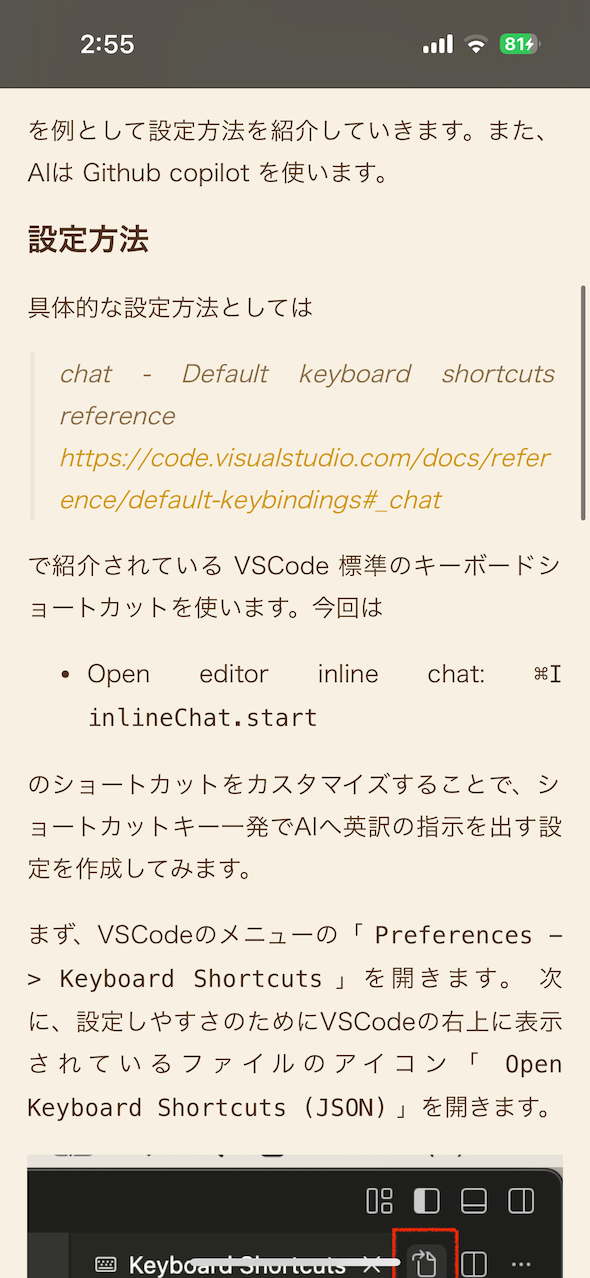
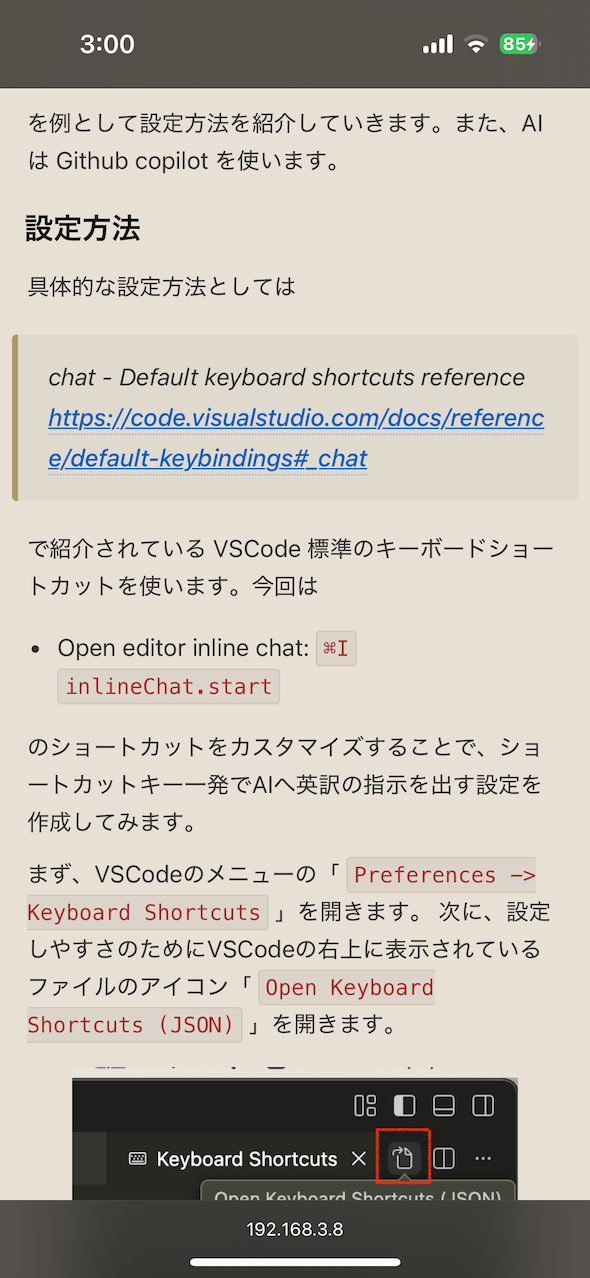
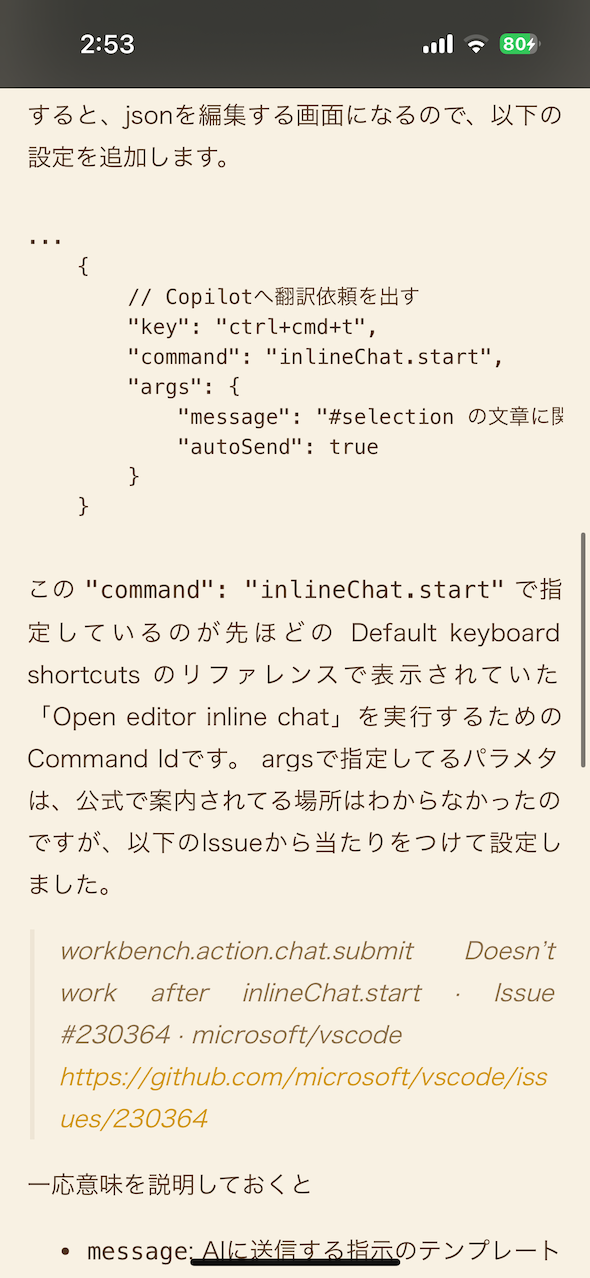
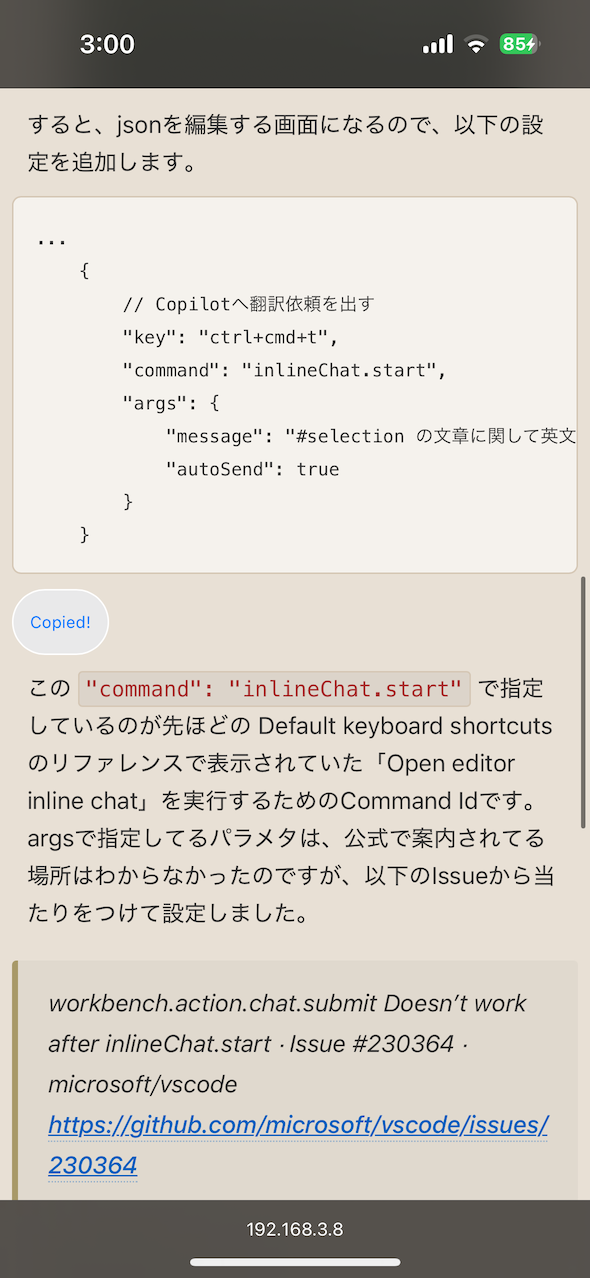
比較して気づいたのですが、若干暗めの見た目になってますね。このあたりは調整できますので、お好みに合わせて調整していただければと思います。
Safari のリーダー表示との主な違いは以下の通りです。
- 箇条書きや引用ブロックで不要な隙間が入らない
- 文章中に埋め込まれたコードブロックが見やすくなる
- pre タグのコードブロックが見やすくなる
- コードが少し小さめに表示され、スマホでも読みやすくなる
- リーダー表示に対応していないページでも使えるので、どのページでも読みやすくできます
以上です。
まとめ
スマホで見にくい Web ページを簡単に見やすくする Bookmarklet を紹介しました。 Bookmarklet なので特別なアプリをインストールする必要はなく、簡単に設定できます。スマホでブログをよく読む方は、ぜひ試してみてください。
おまけ
実は、以前同様のことをする Bookmarklet があり、それを好んで使っていましたが、あるとき急に動かなくなってしまいました。
iPhoneのSafariが10倍便利になるブックマークレット10個 | カミアプ | AppleのニュースやIT系の情報をお届け
https://www.appps.jp/161142/
….
「開いているWebページを見やすく表示」
しばらく諦めていたのですが、AI が登場した際に自作できるのでは?と挑戦しようと思い立ち、今回紹介した Bookmarklet を作成した、という経緯です。